Home Blog

Membership Wallet Policy

0

# Privacy Policy

## Data Collection

Membership Wallet does **not collect, store, or share any personal data**.

### What This Means

– We do not track your activity within the app

– We do not store your test scores, answers, or learning history

– We do not collect your location, device identifiers, or analytics data

– We do not use cookies or similar tracking technologies

– We do not sell or share any information with third parties

### Local Storage

All data on your device (such as your app settings, theme preferences, and notification settings) is stored locally on your device only. This data is never sent to our servers.

### Questions or Concerns

If you have any questions about your privacy while using CitizenShip, please contact us at:

**Email:** samderlust@gmail.com

**Last Updated:** November 29, 2025

Privacy Policy

0

Data Collection

CitizenShip does not collect, store, or share any personal data.

What This Means

  • We do not track your activity within the app
  • We do not store your test scores, answers, or learning history
  • We do not collect your location, device identifiers, or analytics data
  • We do not use cookies or similar tracking technologies
  • We do not sell or share any information with third parties

Local Storage

All data on your device (such as your app settings, theme preferences, and notification settings) is stored locally on your device only. This data is never sent to our servers.

Subscription Information

Payment processing for subscriptions is handled by Apple (App Store) or Google (Google Play). We do not collect or store payment information. Your subscription status is managed through RevenueCat, a third-party subscription service. Please refer to RevenueCat’s privacy policy for details on how they handle subscription data.

Questions or Concerns

If you have any questions about your privacy while using CitizenShip, please contact us at:

Email: samderlust@gmail.com


Last Updated: November 29, 2025

CitisenSip Support

0

Contact Us

If you need assistance or have questions, email samerlust@gmail.com

Frequently Asked Questions

How do I get started with the Citizenship app?

Download the app from the App Store or Google Play Store, create an account, and begin exploring citizenship topics organized by category.

Are there any prerequisites for using this app?

No prerequisites required. The app is designed for anyone interested in learning about citizenship, from beginners to those preparing for citizenship exams.

How often is the content updated?

Content is regularly updated to reflect current information and events. Check the app for the latest updates.

Can I use this app offline?

Yes, the app can be used offline. You can access downloaded content without an internet connection.

How do I report a bug or suggest a feature?

Visit our support page at the URL above and use the feedback form to report issues or suggest new features.

Is my data secure?

Yes, the app doesn’t collect any user data. Your privacy is protected as we don’t store or transmit personal information.

For more questions, please contact our support team at the support URL above.

Korean Easy – Support Information

0

Contact Us

For any questions, issues, or support requests, please reach out to us through the following channels:

Frequently Asked Questions (FAQs)

General Questions

Q: What is Korean Easy?
A: Korean Easy is a language learning app designed to help users learn Korean in an engaging and effective way.

Q: Is Korean Easy free to use?
A: Korean Easy offers both free and premium features. You can access basic content for free, with additional premium features available through in-app purchases.

Technical Support

Q: The app is not working properly. What should I do?
A: Please try the following troubleshooting steps:

  1. Ensure your app is updated to the latest version
  2. Restart the app
  3. Check your internet connection
  4. If issues persist, contact our support team

Q: How do I restore my purchases?
A: You can restore your purchases by:

  1. Going to the app settings
  2. Selecting “Restore Purchases”
  3. Following the on-screen instructions

Account & Data

Q: How do I reset my progress?
A: You can reset your progress in the app settings. Please note that this action cannot be undone.

Q: Is my data backed up?
A: Your progress is automatically saved locally on your device. We recommend regularly backing up your device to preserve your data.

Privacy & Security

We take your privacy seriously. For detailed information about how we handle your data, please refer to our Privacy Policy.

Feedback & Suggestions

We value your feedback! If you have suggestions for improving Korean Easy, please contact us at samderlust@gmail.com.

Last Updated: Apr 16, 2025


User Data Policy

0

1. Introduction

This policy describes how Korean Easy collects, uses, handles, and protects user data. We are committed to protecting your privacy and ensuring transparent data practices in compliance with both Google Play Store and Apple App Store policies, as well as applicable laws.

2. Data Collection and Usage

2.1 Types of Data We Collect

We collect and handle the following types of data:

  • Device information (e.g., device model, operating system version, unique device identifiers)
  • App usage data (e.g., app launches, usage patterns, features used)
  • User-provided data (e.g., feedback, support requests)
  • [List any other specific data types your app collects]

2.2 Purpose of Data Collection

All data collection is limited to:

  • Core app functionality
  • Essential service features
  • Analytics and app performance
  • Policy-compliant purposes reasonably expected by users

2.3 Data Security

We implement the following security measures:

  • Modern cryptography for data transmission (HTTPS)
  • Secure data storage practices
  • Regular security audits and updates
  • Data encryption at rest and in transit

3.1 Platform-Specific Permissions

Android Devices

  • We request runtime permissions before accessing protected data
  • All permission requests include clear explanations of their purpose
  • Users can revoke permissions through device settings

iOS Devices

  • We request necessary permissions through iOS permission dialogs
  • App Tracking Transparency (ATT) consent is obtained when required
  • Privacy nutrition labels are accurately maintained in App Store

3.2 Prominent Disclosure

For any data collection or usage, we provide:

  • Clear in-app disclosures
  • Explicit consent requests
  • Detailed explanations of data usage
  • Transparent information about data sharing
  • Option to opt-out where applicable

4. Third-Party Integration

4.1 Third-Party Services

  • All integrated third-party services (SDKs) comply with platform policies
  • Third parties are contractually bound to protect user data
  • We ensure third parties do not sell personal and sensitive user data
  • Third-party data handling practices are monitored for compliance

4.2 Data Sharing

We do not:

  • Sell personal or sensitive user data
  • Share data with unauthorized parties
  • Use data for undisclosed purposes
  • Track users across apps without consent

5. User Rights and Control

5.1 Account Management

Users can:

  • Request account deletion
  • Access their collected data
  • Update their privacy preferences
  • Opt-out of optional data collection
  • Control tracking preferences

5.2 Data Deletion

Upon account deletion:

  • All associated user data is removed
  • Third-party services are notified to remove data
  • Required data retention periods are clearly communicated

6. Special Data Handling

6.1 Sensitive Data

Special handling procedures for:

  • Financial information
  • Government identification numbers
  • Health data
  • Children’s data (COPPA compliance)

6.2 Device Identifiers

  • Android: Advertising ID and App Set ID usage complies with Google Play requirements
  • iOS: IDFA usage complies with App Tracking Transparency framework
  • Persistent device identifiers are not linked to personal data without consent

7. Platform-Specific Requirements

7.1 Apple App Store

  • Privacy nutrition labels are maintained and accurate
  • App Tracking Transparency framework is implemented
  • Sign in with Apple is supported where applicable
  • Data collection minimization principles are followed

7.2 Google Play Store

  • Data safety section is accurately maintained
  • Advertising ID policies are followed
  • Prominent disclosures are provided as required
  • Personal and sensitive data handling complies with requirements

8. Contact Information

  • samderlust@gmail.com

9. Updates to This Policy

We will notify users of any material changes to this policy through:

  • In-app notifications
  • Email communications (if applicable)
  • App store updates

10. Compliance

This policy complies with:

  • Google Play Developer Program Policies
  • Apple App Store Review Guidelines
  • App Tracking Transparency requirements
  • Applicable privacy and data protection laws (GDPR, CCPA, etc.)
  • Children’s Online Privacy Protection Act (COPPA) if applicable

Last Updated: 2025-02-11

Calendar Day View 

0

A fully customizable Calendar day view library 

This package is dedicated to calendar day view. While there are many calendar packages out there. It seems that not many of them support Day view well. This package clearly is not a calendar replacement but rather a complement to make the calendar in app better. This package aims to give users the most customization they want.

Features 

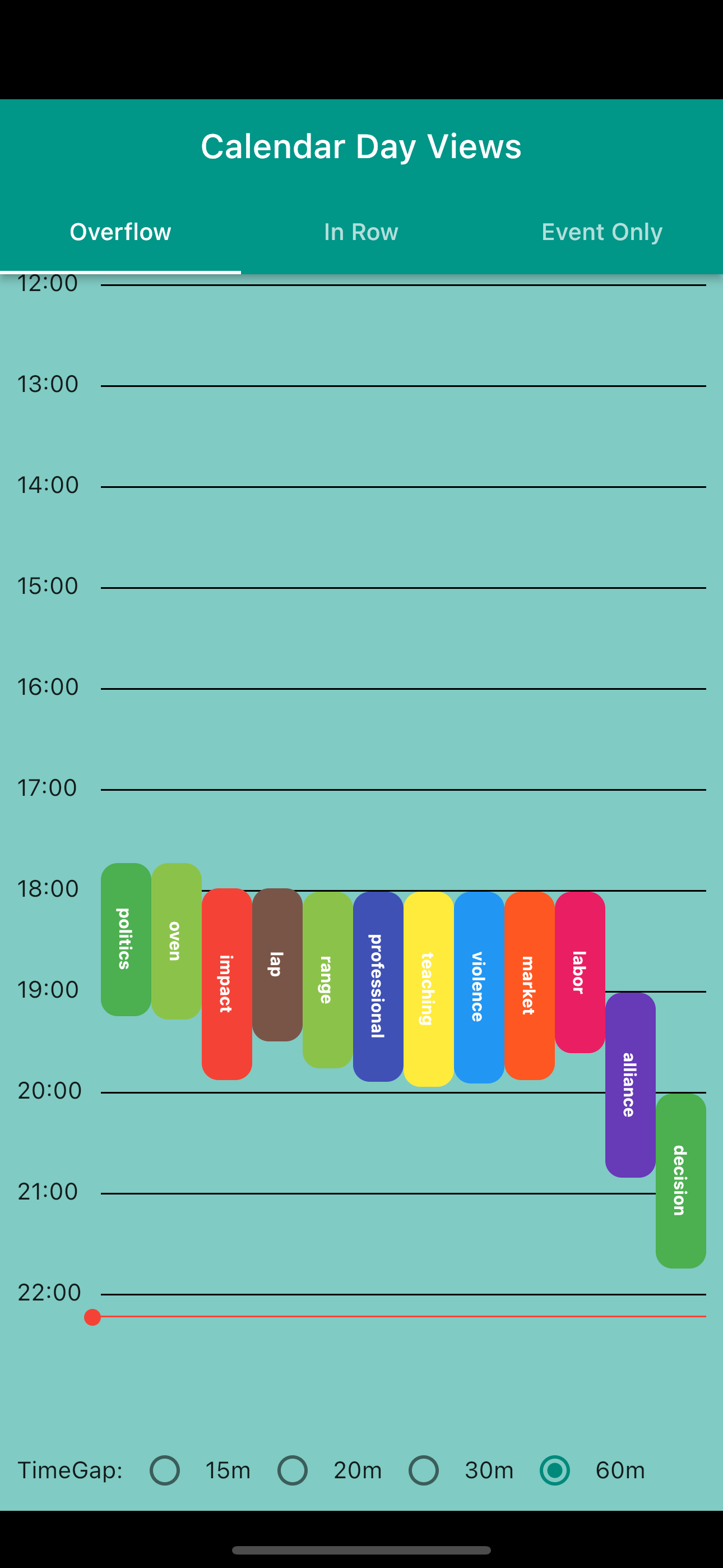
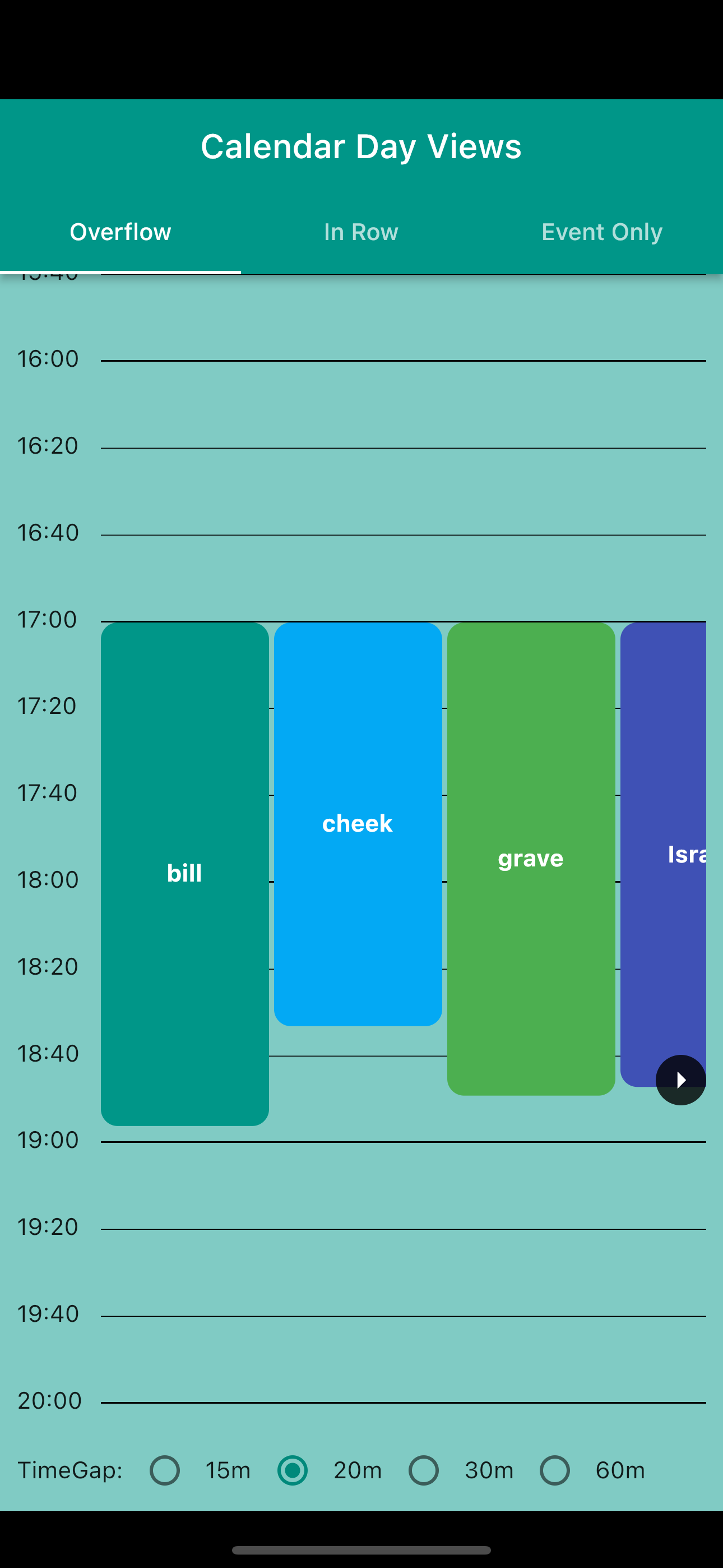
  • Over flow day view: like normal calendar where event is displayed expanded on multiple time row to indicate its duration
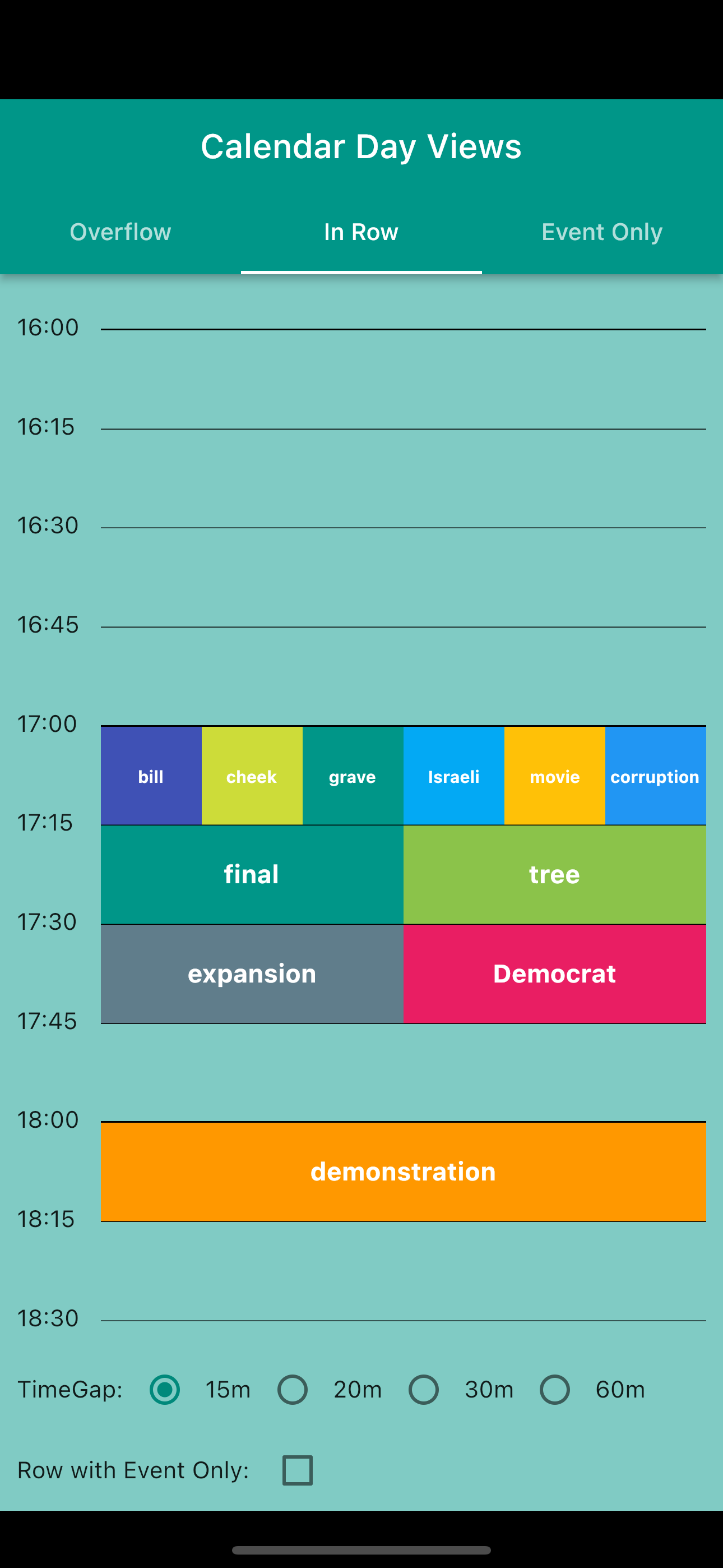
  • In row day view: show all events that start in the same time gap in a row
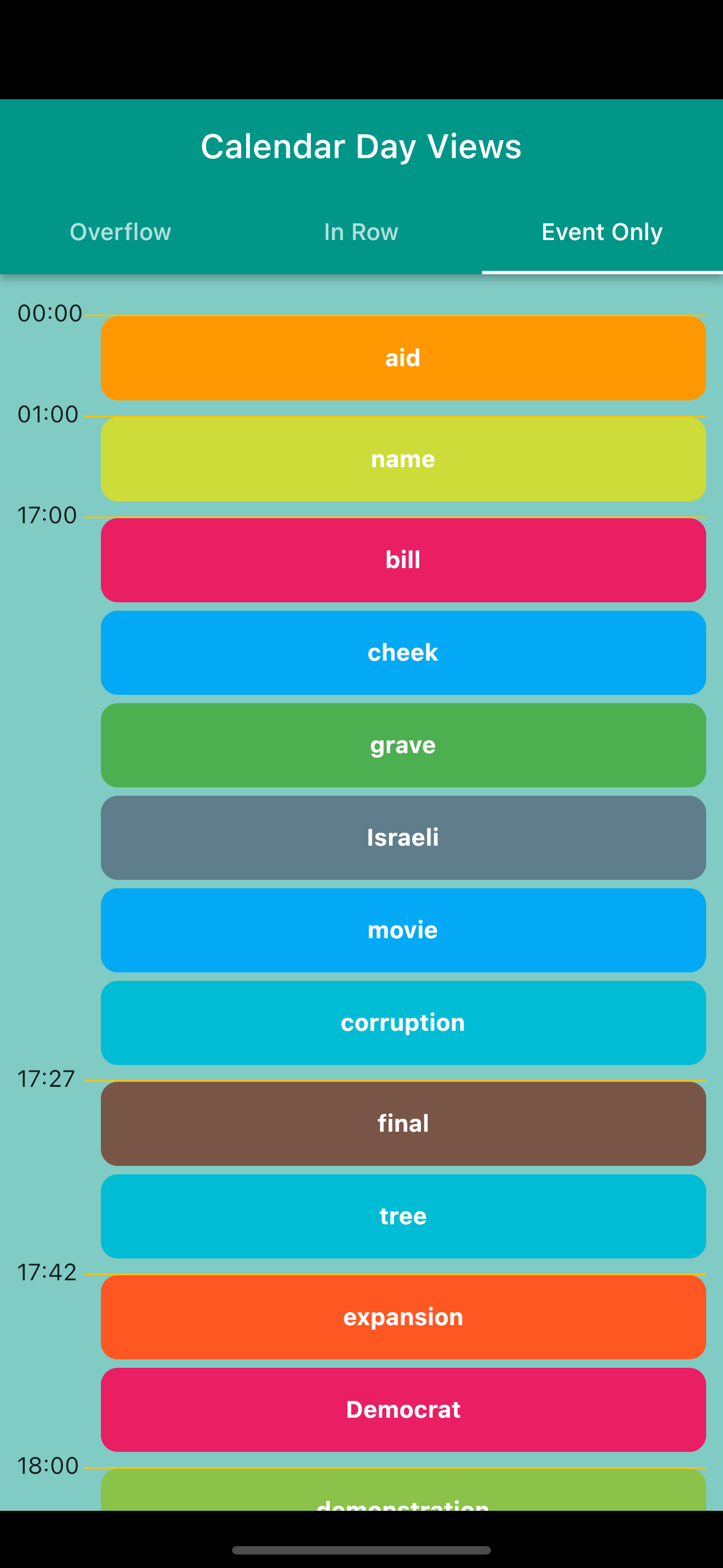
  • Event day view: show all events in day
  • Option to change start of day and end of day in day view
  • Option to change time gap(duration that a single row represent) in day view.
  • Option to show current time on day view as a line

Installing and import the library: 

Like any other package, add the library to your pubspec.yaml dependencies:

dependencies:
    calendar_day_view: <latest_version>

Then import it wherever you want to use it:

import 'package:fetching_state/calendar_day_view.dart';

Usage 

look at example folder for all use cases

1. Overflow Day View 

  • For viewing event and duration as event will be shown on multiple time point rows depends on its own duration. For this to work all [DayEvent] must have non-null end time.
Overflow normalOverflow with ListView
Overflow Day ViewOverflow Day View
renderRowAsListView: falserenderRowAsListView: true
OverFlowCalendarDayView(
            events: events,
            dividerColor: Colors.black,
            startOfDay: const TimeOfDay(hour: 00, minute: 0),
            endOfDay: const TimeOfDay(hour: 23, minute: 0),
            timeGap: 60,
            renderRowAsListView: true,
            showCurrentTimeLine: true,
            showMoreOnRowButton: true,
            overflowItemBuilder: (context, constraints, event) {
              return <<ItemWidget>>
            },
          )

Event Only Day View 

  • For Viewing events only and their starts time
event only day view
 EventCalendarDayView(
      events: events,
      eventDayViewItemBuilder: (context, event) {
        return Container(
          color: getRandomColor(),
          height: 50,
          child: Text(event.value),
        );
      },
    );

In Row Day View 

  • For viewing events that starts in a same time window (15min, 30mins,…)
In Row Day View
InRowCalendarDayView<String>(
            events: events,
            heightPerMin: 1,
            showCurrentTimeLine: true,
            dividerColor: Colors.black,
            timeGap: 15,
            showWithEventOnly: withEventOnly.value,
            startOfDay: const TimeOfDay(hour: 00, minute: 0),
            endOfDay: const TimeOfDay(hour: 22, minute: 0),
            itemBuilder: (context, constraints, event) => Flexible(
              child:<<ITEM WIDGET>>
            ),
          ),

repo: https://github.com/samderlust/calendar_day_view

pub: https://pub.dev/packages/calendar_day_view

Geometry Kit 

0

A set of utils that help with geometry (line, circle, triangle, polygon,…)

Features 

  • distance from a point to a line
  • check if to line segments intersect
  • find intersect point of 2 line segments
  • get area or perimeter of shapes,
  • calculate circumcircle or incircle of a polygon
  • check if a point is in side a polygon

Installing the library: 

Like any other package, add the library to your pubspec.yaml dependencies:

dependencies:
    geometry_kit: <latest_version>

Then import it wherever you want to use it:

import 'package:fetching_state/fetching_state.dart';

Usage 


  // Line
  final line1 = Line(Point(0, 2), Point(2, 0));
  final line2 = Line(Point(0, -1), Point(3, 2));

  final intersect = LineUtils.getSegmentIntersect(line1, line2);

  print(intersect); //Point(1.5, 0.5)
//Polygon
  final polygon = [
    Point(1, 0),
    Point(0, 2),
    Point(0, 3),
    Point(2, 5),
    Point(3, 5),
    Point(5, 3),
    Point(5, 1),
    Point(3, 0),
  ];

  final point1 = Point<num>(5, 2);
  var isInside = PolygonUtils.isInsidePolygon(point1, polygon);
  print(isInside); // true

repo: https://github.com/samderlust/geometry_kit

pub: https://pub.dev/packages/geometry_kit

Fetching State

0

Fetching State 

A small package that helps easily to work with UI changes base on the state of fetching remote data

Features 

  • Get rid of if else statements in UI when state change. Hence, cleaner UI code
  • Decide what to display when fetching remote data in 4 states [init, loading,done, error, loadingMore]
  • Option to pass the data or error objects in onDone and onError

Getting started 

Installing the library: 

Like any other package, add the library to your pubspec.yaml dependencies:

dependencies:
    fetching_state:

Then import it wherever you want to use it:

import 'package:fetching_state/fetching_state.dart';

Usage 

see full example in example folder

1 . FetchingState 


  Future<void> getDone() async {
    setState(() {
      _fetching = _fetching.copyWhenLoading();
    });
    await Future.delayed(const Duration(milliseconds: 500));

    setState(() {
      _fetching = _fetching.copyWhenDone(data: 'DONE IN STATE');
    });
  }

  Future<void> loadMoreText() async {
    setState(() {
      _fetching = _fetching.copyWhenLoadingMore();
    });

    await Future.delayed(const Duration(milliseconds: 500));

    if (_fetching.data == null) {
      setState(() {
        _fetching = _fetching.copyWhenError(error: 'No current data');
      });
      return;
    }

    setState(() {
      _fetching =
          _fetching.copyWhenDone(data: '${_fetching.data} - extra text');
    });
  }

  Future<void> getError() async {
    setState(() {
      _fetching = _fetching.copyWhenLoadingMore();
    });
    await Future.delayed(const Duration(milliseconds: 500));

    setState(() {
      _fetching = _fetching.copyWhenError(error: 'Error IN STATE');
    });
  }

  Future<void> getInit() async {
    setState(() {
      _fetching = _fetching.copyWhenLoadingMore();
    });
    await Future.delayed(const Duration(milliseconds: 500));
    setState(() {
      _fetching = FetchingState.init(data: '');
    });
  }

1.2 capture change in UI 

 return _fetching.when(
    onInit: () => const Text(
      'INIT',
      style: TextStyle(color: Colors.blue),
    ),
    onDone: (text, isLoadingMore) => Text(
      '${text ?? ''} ${isLoadingMore ? '....' : ''}',
      style: const TextStyle(color: Colors.green),
    ),
    onError: (error) => Text(
      error!.toString(),
      style: const TextStyle(color: Colors.red),
    ),
    onLoading: () => const CircularProgressIndicator(),
  );

2. LoadStatus 

declare a class with LoadStatus mixin

class Counter with LoadStatusMixin {
  final int value;

  Counter(this.value);

  Counter copyWith({int? value}) {
    return Counter(value ?? this.value);
  }
}

manipulate state


  void increase() async {
    setState(() {
      _counter.setLoadStatusLoading();
    });

    await Future.delayed(const Duration(milliseconds: 500));
    setState(() {
      _counter = _counter.copyWith(value: _counter.value + 1);
      _counter.setLoadStatusDone();
    });
  }

UI implement:

  return _counter.whenOrElse(
      onLoading: () => const CircularProgressIndicator(),
      onDone: (_) => Text(_counter.value.toString()),
      onInit: () => const Text('Init'),
      onError: () => const Text('Error'),
      orElse: () => const Text('Nothing'),
    );

repo: https://github.com/samderlust/fetching_state

pub: https://pub.dev/packages/fetching_state

izetool

0

This is an open-source project to create a toolbox that helps you save time with boilerplate. Whatever your project is. The toolbox helps run command line to create your project and then create folders and files as follow the structure you provide

support: Linux, MacOS

Install

  1. Clone the project git clone https://github.com/samderlust/izetool.git
  2. run make izetool in the root folder to install the toolbox into your system
  3. run ize init to create ize_templates folder at home dir. This is where you store your template files

Available commands

commandusagenote
flutter createize flutter_create <name> --template=<template> or ize flutter_create <name>if --template is not provide, the example.json will be used as default template.
flutter uploadkeystoreize flutter uploadkeystoreprocess to create android upload keystore. After that, create key.properties file and also modify your app/build.gradle file.
makeize make <template> --name=<name>must provide a template.<template> is the same as file name

repo: https://github.com/samderlust/izetool

Introduction of fetching_state package

0

This package is inspired by the Union type provided by freezed package. But sometimes, it could be too complicating or you join a legacy project or a team project that it’s not ready to migrate to that package.

Fetching_state for simplification

Most of the time, in your app, you have to fetch remote data that would take a while after sending the request until obtaining the data. That is where and when you want to display something like a Loading Indicator and then either a successful fetched content or error content.

Normally, we would you some boolean state to indicate whether data is being fetched, another state for notifying error. Follow by some if else statements.

That’s why I create the package fetching_state. This package helps you to handle fetching state easier and cleaner, get rid of those if else statements when data is fetching, finished fetching, or error on fetching even an init state that lives before those ones.

Features of fetching_state package

  • Get rid of if else statements in UI
  • Decide what to display when fetching remote data in 4 states [initloading,doneerror]
  • Option to pass the data or error objects in onDone and onError

Usage of fetching_state

In this example, for the sake of simplification, we use a stateful widget. But this package and be used with any state management solution.

create a fetching state with init state _fetching = FetchingState.init();

and then, depending on the state of your app we can set it to appropriate status as follow

_fetching = FetchingState.loading();

_fetching = FetchingState.done()

_fetching = FetchingState.error()

In the build method, you can use when or whenOrElse method to build the corresponding widget.

For more options, you can pass data into FetchingState.done({T? data}) and FetchingState.error({E? error}). These data later can be accessed in: R Function(T? data) onDone, R Function(E? error) onError when you declare your when method as in the example.

return _fetching.when(
                    onInit: () => const Text(
                      'INIT',
                      style: TextStyle(color: Colors.blue),
                    ),
                    onDone: (text) => Text(
                      text!,
                      style: const TextStyle(color: Colors.green),
                    ),
                    onError: (error) => Text(
                      error!,
                      style: const TextStyle(color: Colors.red),
                    ),
                    onLoading: () => const CircularProgressIndicator(),
                  );

for more details, please visit: https://pub.dev/packages/fetching_state

Full Example

import 'package:fetching_state/fetching_state.dart';
import 'package:flutter/material.dart';

void main() {
  runApp(
    const MyApp(),
  );
}

class MyApp extends StatelessWidget {
  const MyApp({Key? key}) : super(key: key);

  // This widget is the root of your application.
  @override
  Widget build(BuildContext context) {
    return MaterialApp(
      title: 'Fetchin State Example',
      theme: ThemeData(
        primarySwatch: Colors.blue,
        textTheme: const TextTheme(
          bodyText2: TextStyle(
            fontSize: 20,
            fontWeight: FontWeight.bold,
          ),
        ),
      ),
      home: const Example(),
    );
  }
}

class Example extends StatefulWidget {
  const Example({Key? key}) : super(key: key);

  @override
  _ExampleState createState() => _ExampleState();
}

class _ExampleState extends State<Example> {
  late FetchingState<String, String> _fetching;
  @override
  void initState() {
    _fetching = FetchingState.init();
    super.initState();
  }

  Future<void> getDone() async {
    setState(() {
      _fetching = FetchingState.loading();
    });
    await Future.delayed(const Duration(milliseconds: 500));

    setState(() {
      _fetching = FetchingState.done(data: 'DONE IN STATE');
    });
  }

  Future<void> getError() async {
    setState(() {
      _fetching = FetchingState.loading();
    });
    await Future.delayed(const Duration(milliseconds: 500));

    setState(() {
      _fetching = FetchingState.error(error: 'Error IN STATE');
    });
  }

  Future<void> getInit() async {
    setState(() {
      _fetching = FetchingState.loading();
    });
    await Future.delayed(const Duration(milliseconds: 500));
    setState(() {
      _fetching = FetchingState.init();
    });
  }

  @override
  Widget build(BuildContext context) {
    return Scaffold(
      body: SafeArea(
        child: Column(
          mainAxisSize: MainAxisSize.max,
          mainAxisAlignment: MainAxisAlignment.center,
          children: [
            Center(
              child: Builder(
                builder: (context) {
                  return _fetching.when(
                    onInit: () => const Text(
                      'INIT',
                      style: TextStyle(color: Colors.blue),
                    ),
                    onDone: (text) => Text(
                      text!,
                      style: const TextStyle(color: Colors.green),
                    ),
                    onError: (error) => Text(
                      error!,
                      style: const TextStyle(color: Colors.red),
                    ),
                    onLoading: () => const CircularProgressIndicator(),
                  );
                },
              ),
            ),
            const SizedBox(
              height: 40,
            ),
            ElevatedButton(
              onPressed: getDone,
              child: const Text('Done'),
            ),
            ElevatedButton(
              onPressed: getError,
              child: const Text('Error'),
            ),
            ElevatedButton(
              onPressed: getInit,
              child: const Text('Init'),
            ),
          ],
        ),
      ),
    );
  }
}